For game projects, we always hope players can experience the latest games at the lowest cost. This includes CDN costs during operation, as well as players’ data and time costs during download. Smaller, faster, and more economical is an eternal pursuit.
So, when a game’s installation package is updated (the so-called major version), does the player need to download all resources completely again?
Large mobile games in the current market have a huge resource footprint, reaching over 10GB. If players download the full package every time an update occurs, it’s a poor choice for both operational costs and user experience.
When switching versions, players actually have the complete resources from the previous version locally. If these can be utilized, the portion that needs to be downloaded can be significantly reduced. Therefore, a mechanism capable of reusing old version resources is needed!
This article will address this pain point by sharing a resource reuse solution for major version updates, minimizing the resources players need to download, and making it easy to publish and maintain.
It has achieved excellent results in actual online project operations.
Foreword
First, let’s consider a question: When UE repacks, which files/resources might change?
Due to UE’s build process, when a complete repackage occurs, the potential resource changes compared to the previous version are very complex. From engine basic configuration to underlying rendering, from asset property changes to serialization methods, all can cause differences in the build output.
Unlike hotfixes, hotfixes are incremental updates that assume the engine base remains unchanged, only updating Gameplay logic without involving asset serialization changes. However, when a full repackage is done, any resource can potentially change!
In my previous article (Runtime Reorganization Solution for Pak in Unreal Engine), I proposed an update solution based on runtime reorganization. However, it requires the client to implement pak creation and encryption, which increases the client’s execution burden: difference calculation, scattered download requests, local pak generation, encryption, etc. As well as the potential risk of key leakage (all paks need to be decrypted before reorganization).
Therefore, we need to provide a solution that can accommodate any asset changes, is as easy to maintain as possible, and does not increase the client’s computational burden. Additionally, we hope that decryption is performed only on the client side, which can also enable dynamic key distribution and protect pre-embedded assets that have not been officially released (refer to UE PAK Encryption Analysis and Reinforcement Strategy).
Local Old Resources
Before officially starting, let’s consider a question: when the installation package version upgrades from 1.x to 2.0, what assets does it contain locally?
Let’s take Android as an example, analyzing the app’s installation behavior and UE’s loading of files within the installation package.
When an APK is installed on a phone, it essentially installs the app into the following path (/data/app/ + package name + random characters):
1 | sagit:/data/app/com.xxx.yyy-zpgq5nHyY9CNxdLbiAdAgQ== |
UE’s resource files are located within the assets/main.obb.png file inside the apk and are not uncompressed, remaining within base.apk:
1 | Archive: base.apk |
When the game starts, during AndroidPlatformFile initialization, main.obb.png is read from base.apk, and a virtual mapping structure is established in the engine, thereby achieving the purpose of reading internal pak files without decompression.
1 | virtual bool Initialize(IPlatformFile* Inner, const TCHAR* CmdLine) override |
And the internal directory structure of main.obb.png is the virtual path defined by the engine:
1 | Archive: main.obb.png |
Do you remember the three automatically mounted directories introduced in a previous blog post (pak’s automatic mount directory)? They correspond through this method, and then by following the engine’s UFS PlatformFile mechanism, cross-platform in-package file reading can be achieved.
However, the game’s runtime data directory (Saved, etc.) will not exist in /data/app/. It is written to an independent sandbox directory (see article UE Source Code Analysis: Modifying the Game’s Default Data Storage Path), which is separate from the app’s program directory. When the app is upgraded, the data directory is retained.
When the APP is overwritten and installed, the following changes occur at the bottom layer:
- APK Path Update: The old installation path (
/data/app/+ package name + random characters) will be deleted, and the new APK will be placed in a new random character directory; - Library File Update: The
.sonative libraries under the/lib/directory will be completely cleared and re-extracted according to the contents of the new APK; - Bytecode Recompilation: The system will delete the old
.odexor.vdexoptimization files and re-perform AOT (Ahead-Of-Time compilation) or class verification for the new APK;
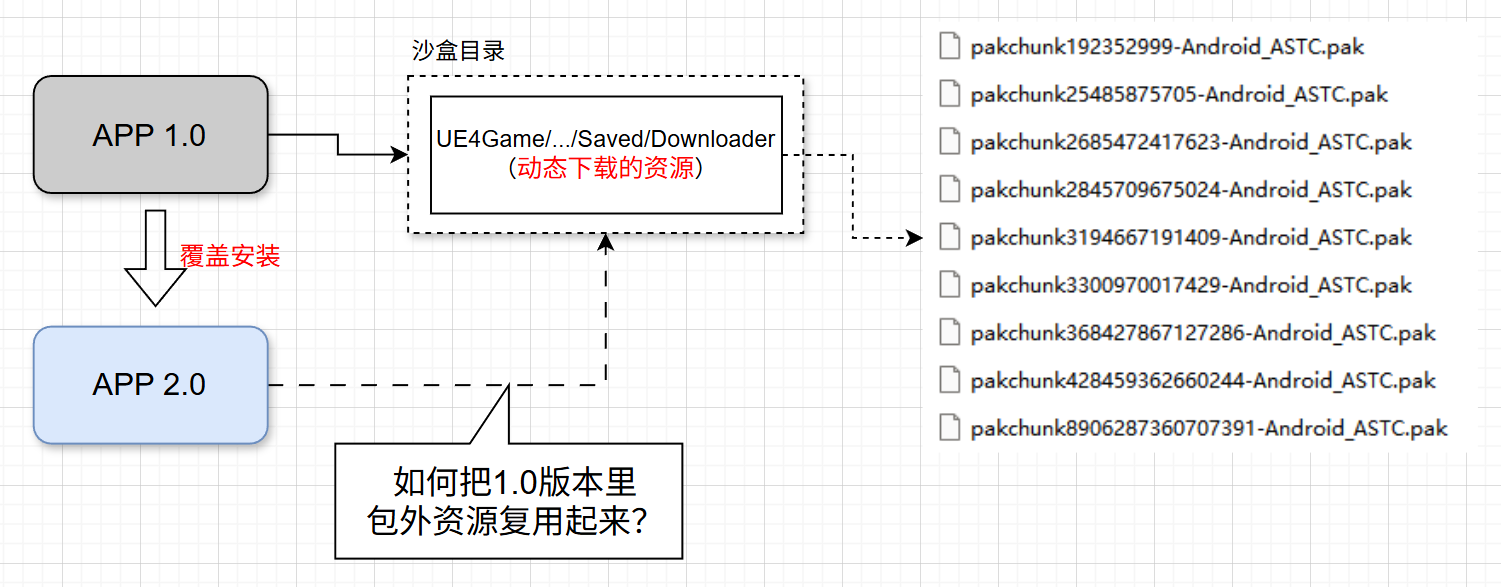
Therefore, based on the above analysis, a conclusion can be drawn: when the APP is overwritten and installed, all files inside the installation package will be replaced with the new version, but the data directory will remain.
Thus, for UE, an overwrite installation of an updated APP will result in the following:
As shown, all assets outside the 1.0 version installation package (usually all dynamically downloaded parts) will remain locally.
For the requirement of major version resource reuse, what we can do is to reuse assets outside of the 1.0 installation package based on the 2.0 APP version.
Feasibility Analysis
What does it mean for UE when local old APP version resources remain?
When switching APP versions, there are usually underlying changes, such as:
- Modifying asset classes: adding, deleting properties, modifying serialization methods
- Modifying engine configurations: causing passive changes to assets
- Modifying C++ classes: affecting Blueprint assets
- Modifying underlying rendering code: Shaders need to be recompiled
- ……
These will cause the program to be out of sync with the old assets. If used directly, it may cause crashes or abnormal behavior.
Starting from UE’s underlying virtual file system, the correct operation of the game relies on loading the correct files. However, for a new app, some resources within the old version’s resources have become incorrect. Therefore, it is necessary to replace mismatched files and add files that did not exist in the old version through patches.
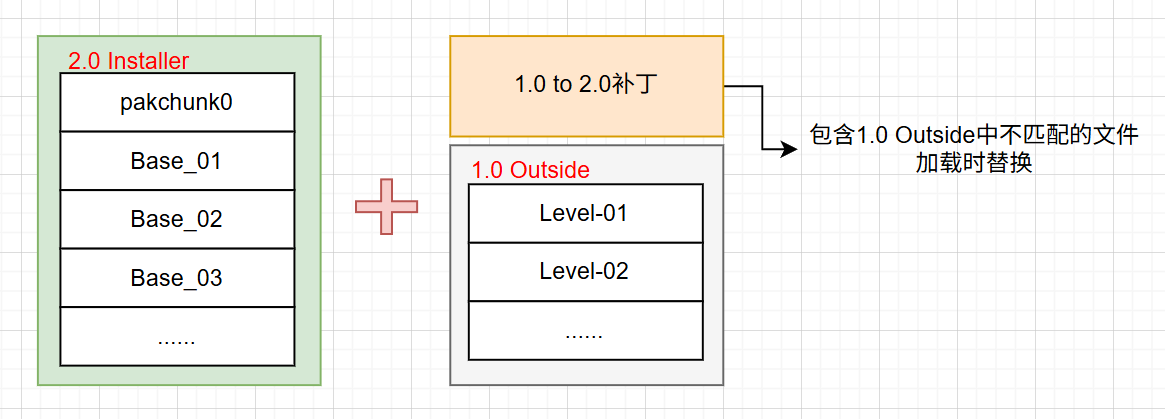
You only need to properly prioritize the patch and old version assets using the engine’s Pak Order mechanism, ensuring the patch has a higher priority than the old version resources, to achieve the file replacement requirement. This is completely consistent with hotfixing.
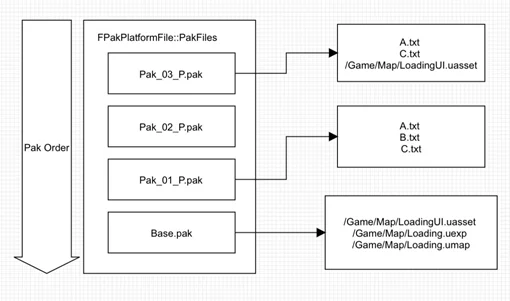
From the engine’s fundamental mechanisms, it is entirely achievable. The key issue now is how to identify which parts of the old version’s remaining resources are mismatched.
How to identify differences?
For UFS, we need the engine to be able to read the latest files, whether they are UASSETs, code scripts, or data files. For UFS, they are all just “files”; the only difference is that for UASSETs, the final list of files included in the package is only produced after COOKing.
So, we need to calculate the differences for all files outside the installation package between versions 1.0 and 2.0. Since the 2.0 installation package already comes with some of the latest resources, those can be ignored.
- For regular files, directly calculate the HASH value.
- For UASSETs, calculate the HASH value of the COOKED products.
Simply put, during packaging and building, it is necessary to record the HASH values of all files in each version, and also be able to distinguish whether each file exists inside or outside the installation package. Based on the HASH differences of files with the same path, we can identify whether a file differs from the latest version.
I implemented this process during the Release export in HotPatcher. In previous versions, only the GUID of the original UASSET asset and its file HASH value were recorded. I extended this part to also record the HASH value of the COOKED file for each UASSET on each platform.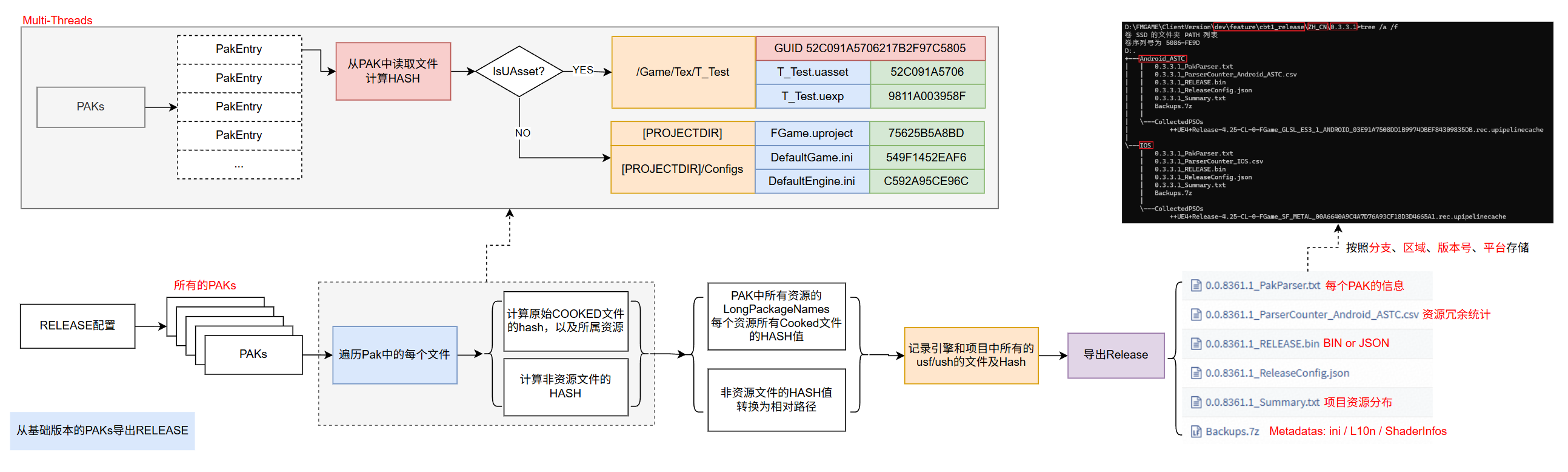
UASSET export information: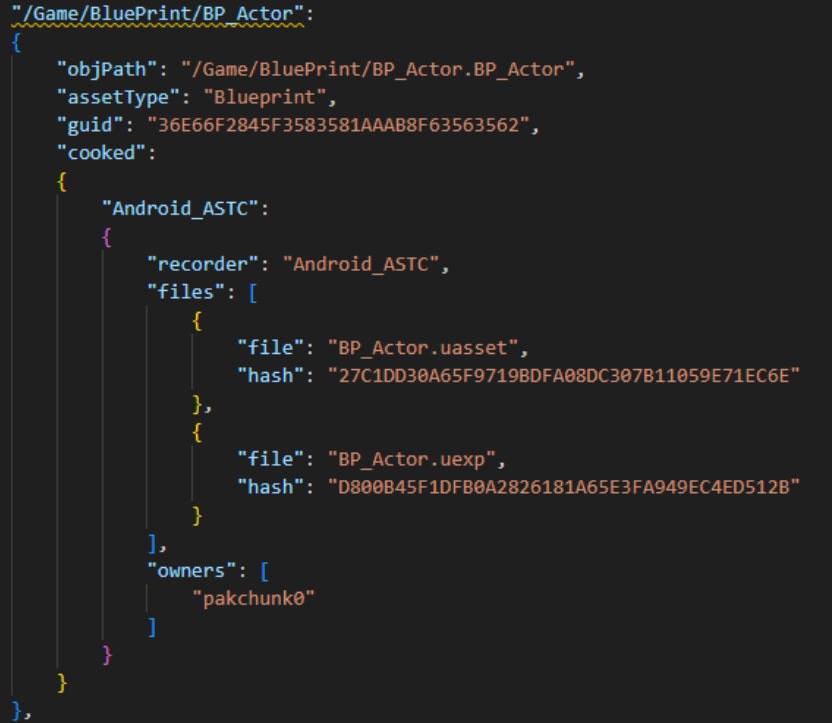
And it will also record which pak each file belongs to, so it can identify whether each asset exists within the installation package.
In the HotPatcher hotfix process, Release data needs to be generated after each package. For major version patch requirements, the Release data from two versions can be directly reused for diffing, which allows for comparing all complete differences between the new and old versions.
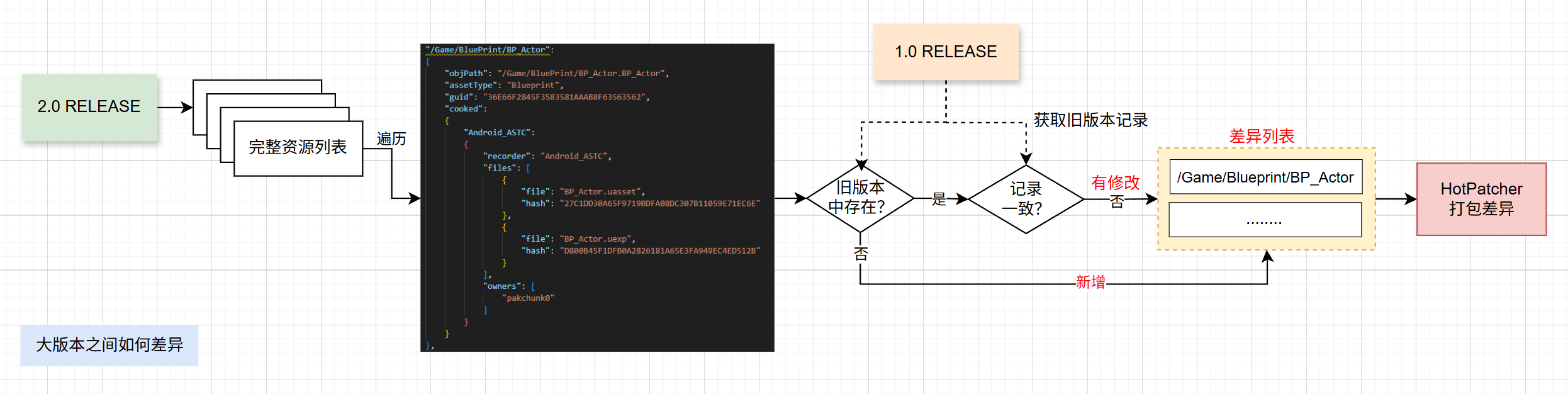
By simply using the latest project + Release data from both the new and old versions, the major version patch diffing process can be achieved, and a complete patch can be directly generated using HotPatcher.
Perhaps you might ask: “Can’t I just take all the PAKs from the new and old versions and diff them directly? What’s the purpose of using HotPatcher‘s Release data then?”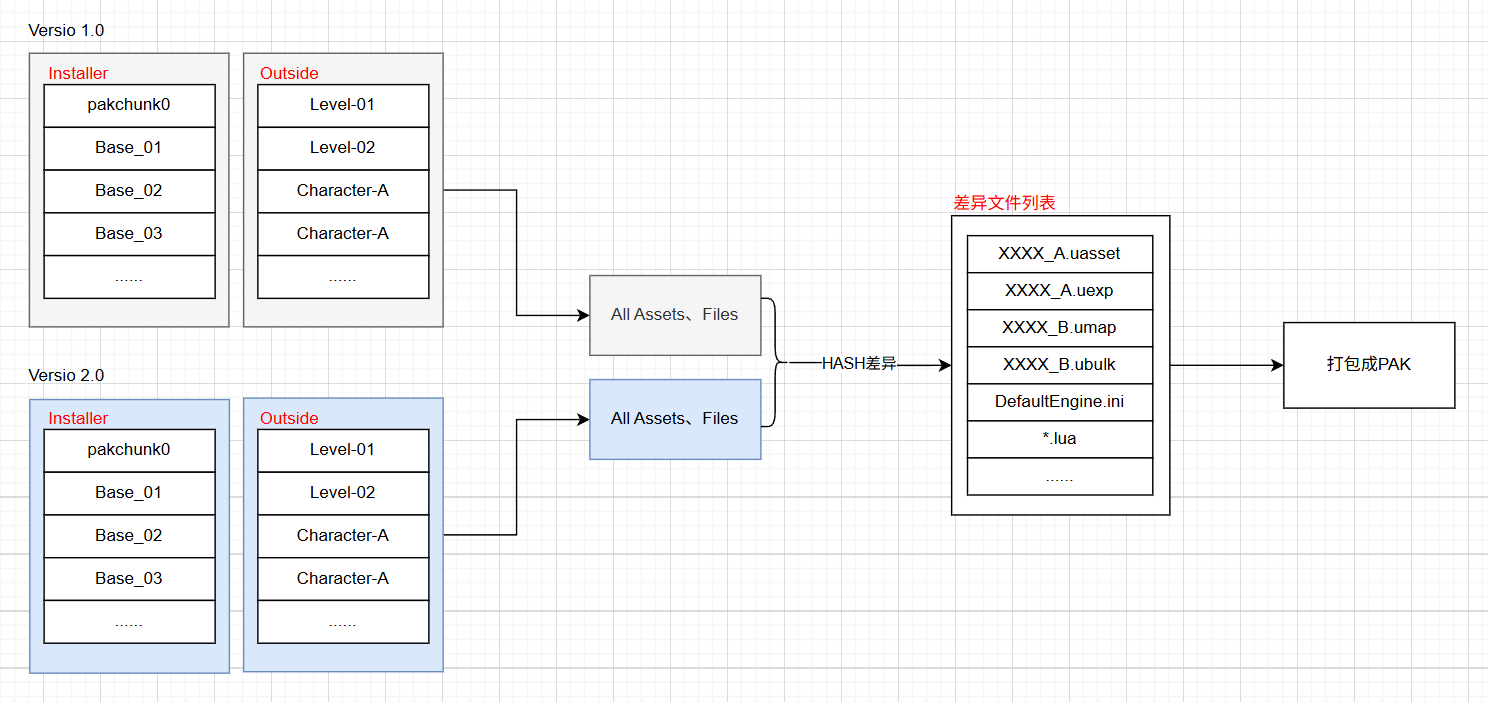
Good question! Let me answer it.
Ideally, that’s indeed the case. HotPatcher essentially utilizes PAK data export, so directly diffing all regular files and UASSET COOKED products from two versions is indeed not a problem.
However, differences between major versions also have some exceptions and maintenance costs:
- For ShaderCodeLibrary, it will inevitably differ between two versions, and including it completely in the patch will cause significant waste (e.g., hundreds of MB for iOS).
- Not just ShaderCode, all files involving data generation have this problem. Another example is AssetRegistry data.
- Maintaining complete PAK files for each version, where each version is 10+GB, is a version management nightmare.
- Files deleted in the new version need to be marked for UFS deletion in the patch.
By utilizing the capabilities within the HotPatcher framework, these problems can be completely avoided, achieving the most flexible version control with extremely low maintenance costs (taking a project with 400,000+ UASSETs, approximately 1 million files, as an example, the generated Release data is only 50MB). And there’s no need to handle any difference logic for ShaderCodeLibrary, Registry, or other data; a single step of patch generation is all that’s needed for publishing.
From an engineering perspective, HotPatcher provides an optimized end-to-end pipeline solution, requiring no attention to internal technical details, achieving fully automated diffing, packaging, and publishing. It perfectly integrates with the hotfix process, sharing the same technical framework.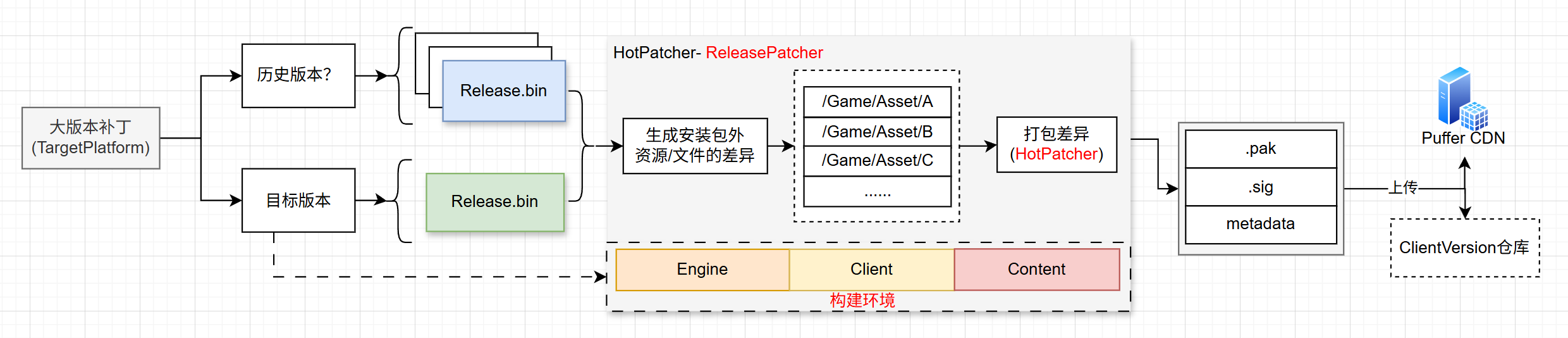
Which parts to package?
A major version patch can only be packaged based on a common baseline version for all players.
For example, if the first player is on version 1.1, the second on 1.2, and the third on 1.3, their local hotfix patches are inconsistent. Therefore, we can only use their common version 1.0 as the basis for diffing, and not a specific hotfix version.
This does cause some waste: some resources in the 2.0 new version might already exist in a hotfix package, but this is a trade-off (of course, if one wants to be thorough, it’s technically feasible). In real projects, a balance must be struck between maintenance cost, solution complexity, and benefits.
In addition, HotPatcher also implements a multi-stage layered diffing mechanism, which can minimize the diffed files:
- Initial diff analysis based on UASSET changes, and analysis of passive changes.
- Based on UASSET differences, convert to differences based on COOKED files. When a UASSET is modified but only affects part of the COOKed output, only the changed file will be packaged.
- On top of step 2, if the UASSET GUID changes but the COOKED output does not, it will be completely excluded.
![]()
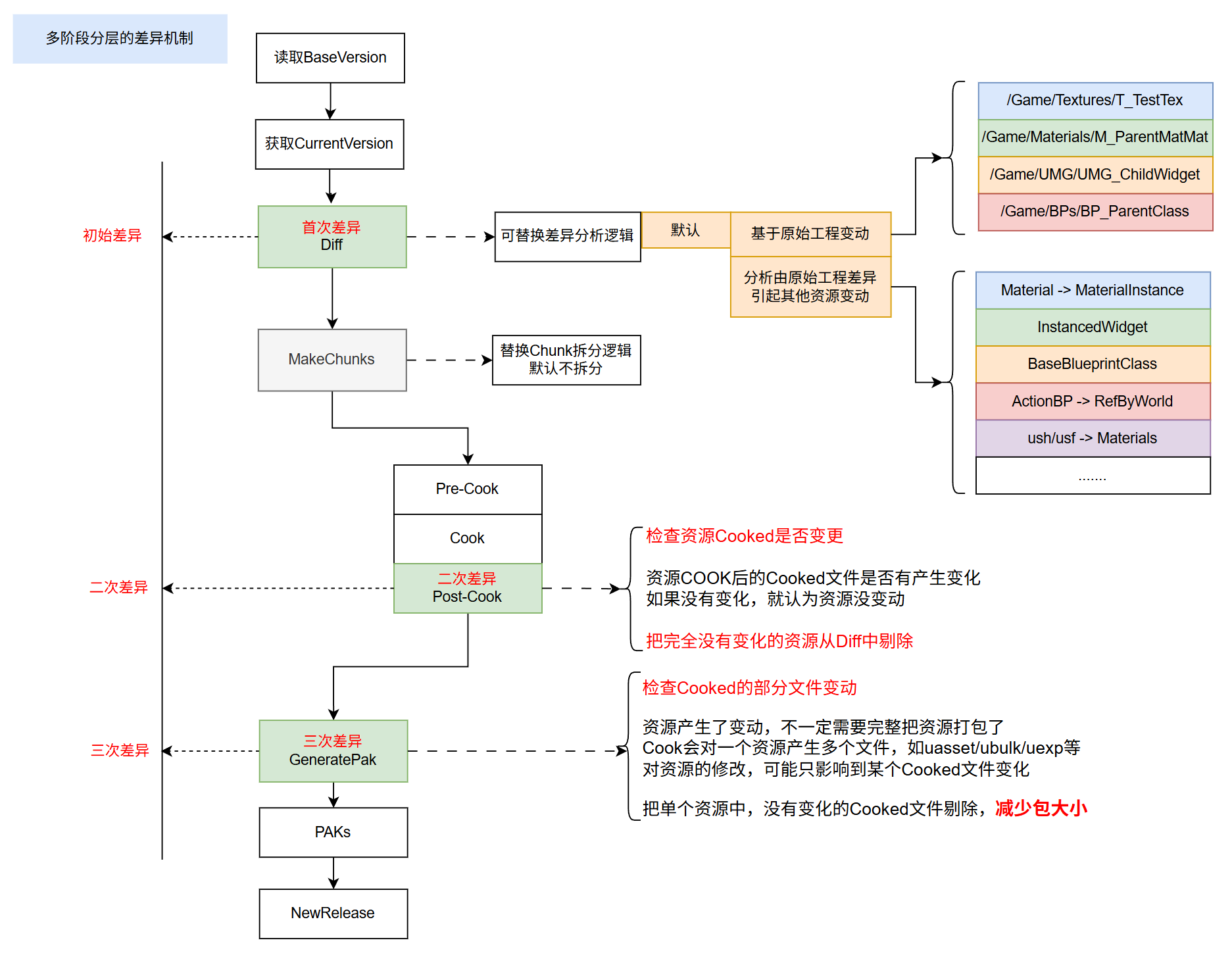
Note: This mechanism can be used for both major version patches and hotfix patch processes.
This way, all actual changes between the two versions can be packaged into a patch.
Patches spanning multiple versions
Simply put, based on the above solution, packaging a major version patch is simplified into three steps:
- Select Release data from a certain old version.
- The latest version of the project + the latest version of Release data.
- Call HotPatcher to perform packaging.
By simply controlling the Release data of the old versions, patches spanning multiple versions can be packaged. The maintenance cost is just a few more sets of Release data.
Runtime Process
Once the patch is ready, the runtime download and loading process needs to be modified to correctly adapt to the new APP version + old version resources + major version patch.
Two things need to be handled:
- Detect the integrity of local version resources, differentiate between downloading a major version patch and a full package.
- Correctly handle PakOrder on top of the new APP + old version resources + major version patch + hotfixes.
Download Switching
The process of detecting the local environment and initiating downloads at startup: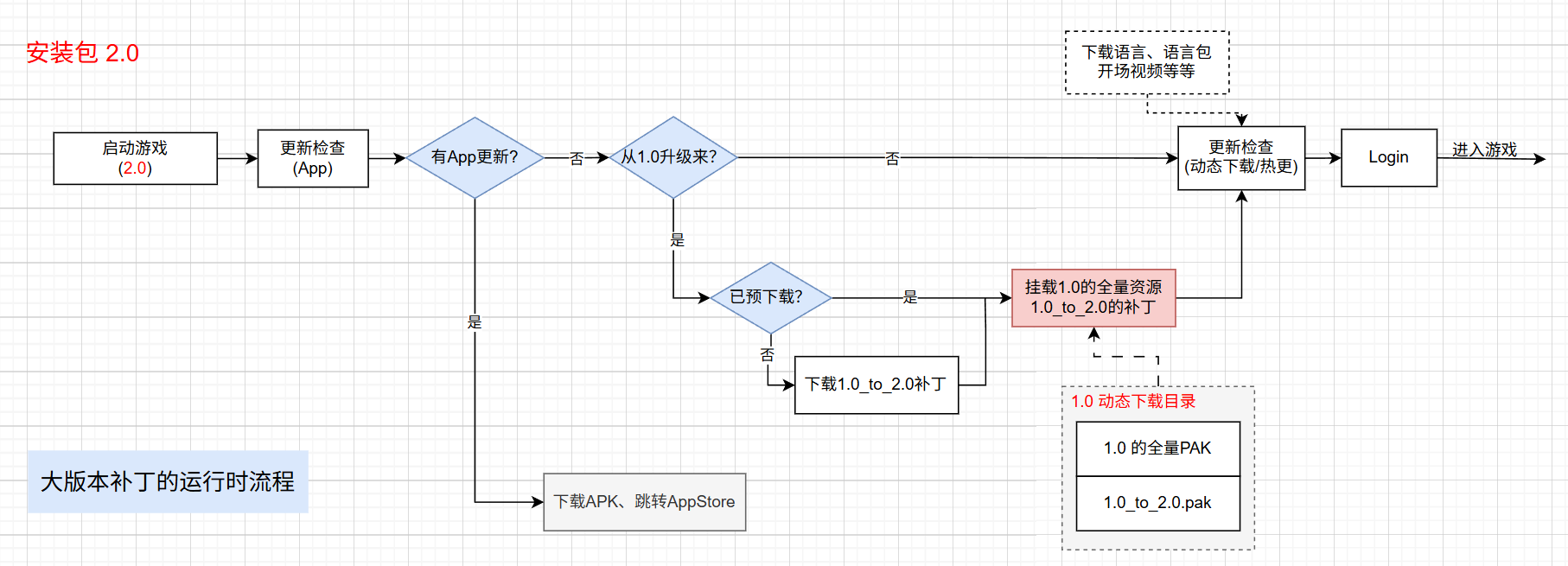
Mount Handling PakOrder
The most critical issue is correctly handling the mount Order of Paks from various sources; this is the core element for the engine to load correctly.
For major version patches, there are several sources:
- Old version resources
- Major version patches (there may be multiple, such as 1.0_to_2.0, 2.0_to_3.0, 3.0_to_4.0)
- PAKs within the new version installation package, such as pakchunk0
- Dynamically downloadable resources
- Hotfix resources
Their priorities must increase sequentially, otherwise, it will cause confusion: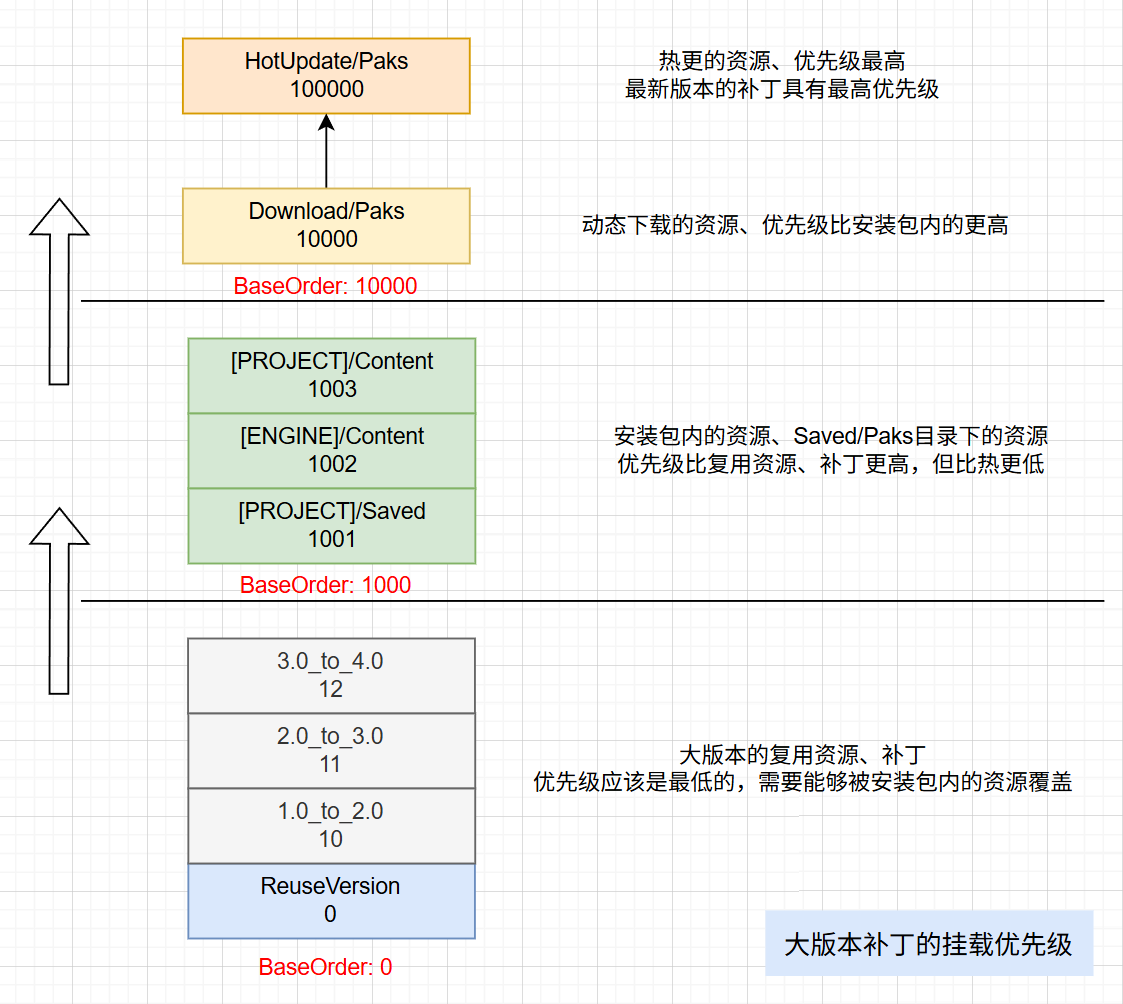
For scenarios with multiple cumulative major version patches, the system must also correctly handle arbitrary version accumulation, maintaining version relationships and priorities: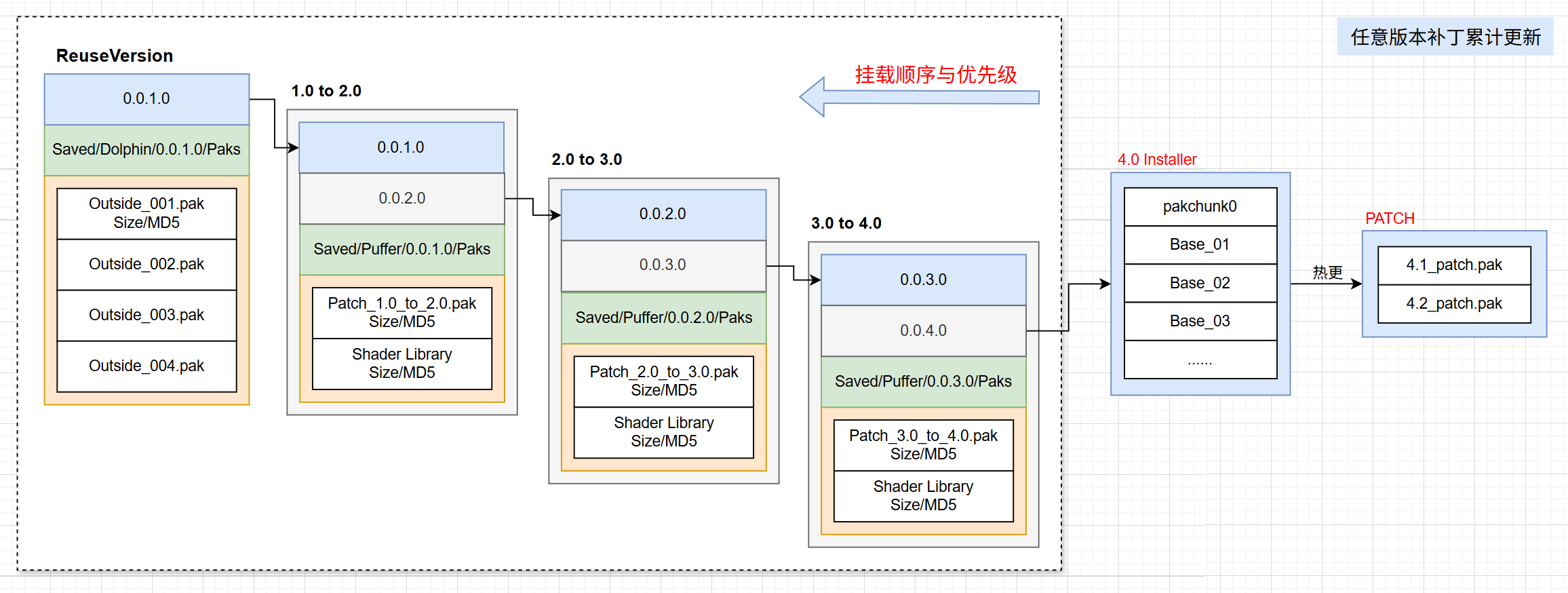
Based on this design, active players (who normally follow the version release rhythm for upgrades) will always enjoy the smallest download size service. For players returning across multiple versions, one can consider having them download all patches from their local version to the latest version, or a merged patch specifically for players skipping multiple versions can be created. The specific strategy can be decided based on the project’s operational circumstances.
Impact on Hotfixes?
No impact. For the same version, there are two scenarios:
- Fresh installation, download full package.
- Upgraded from an old version + major version patch.
According to the previous process, the old version + major version patch can align with the complete resources of the latest version. For hotfixes, both scenarios are based on the same baseline version for updates, so there is no difference.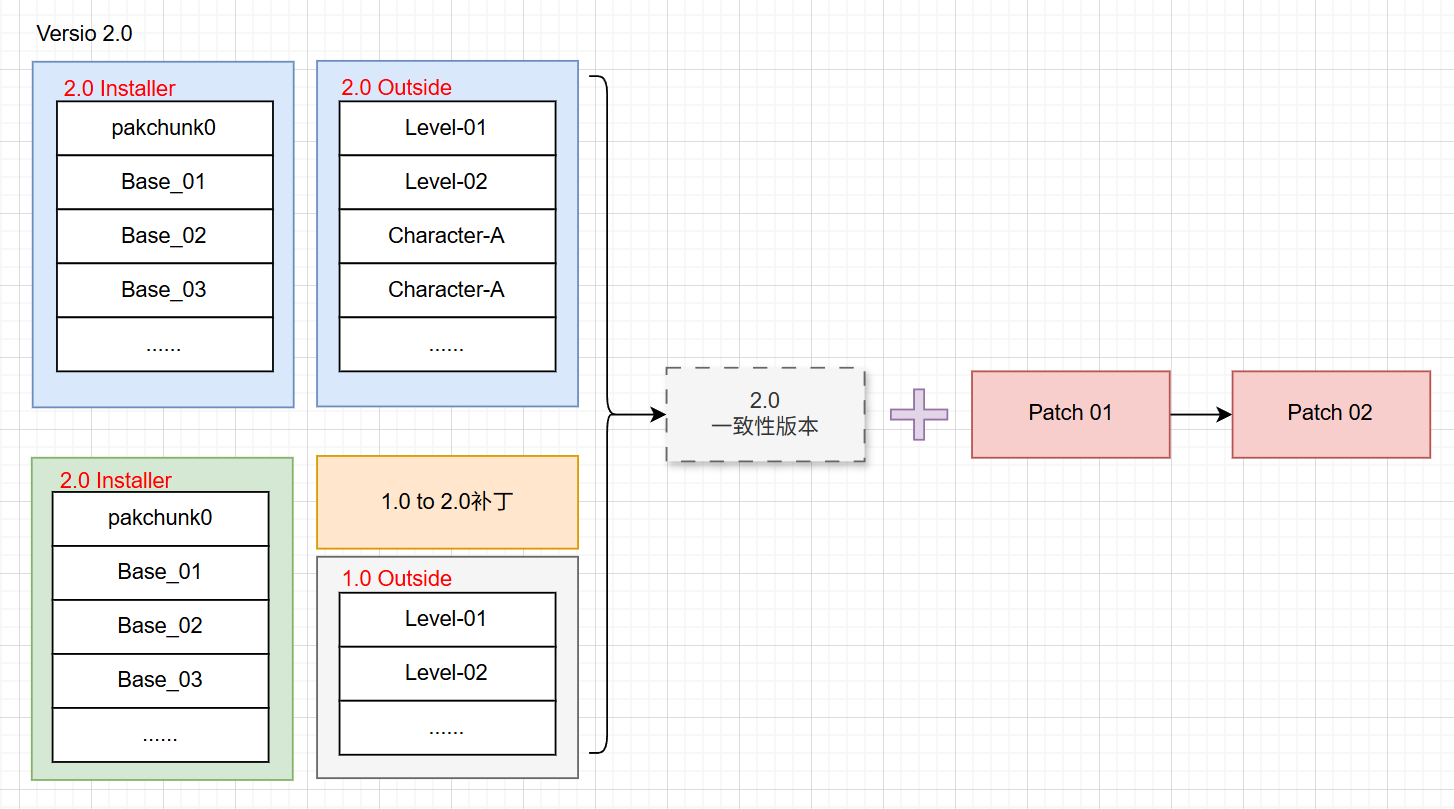
Subsequent hotfixes only need to use HotPatcher to package the differences from the 2.0 consistent version’s RELEASE. There is no need to worry whether the client is a full installation or has a major version patch; there is no difference at the hotfix level, which also reduces complexity.
Potential Problems and Optimization Ideas
For major version patches, it essentially means the client locally mounts several more PAKs, and there are some redundant files within them. Unless runtime reorganization is performed, the redundant space cannot be cleared.
However, besides the increased storage space, I am more concerned about runtime execution efficiency issues.
So, what runtime execution efficiency issues might major version patches bring, and how to address them?
First, because a major version patch is one or more PAK files, there will be some fixed memory overhead during mounting, but this part is small and can be ignored. The part that really needs attention increases with the scale of redundant files: PakEntry.
PakEntry corresponds to each file in the PAK and is the file description used by UFS for lookup and loading. As major version patches are continuously updated, more and more redundant files will accumulate in the local Pak. When the PAK is mounted, PakEntrys will be constructed and occupy memory, so its overhead increases linearly with the number of redundancies.
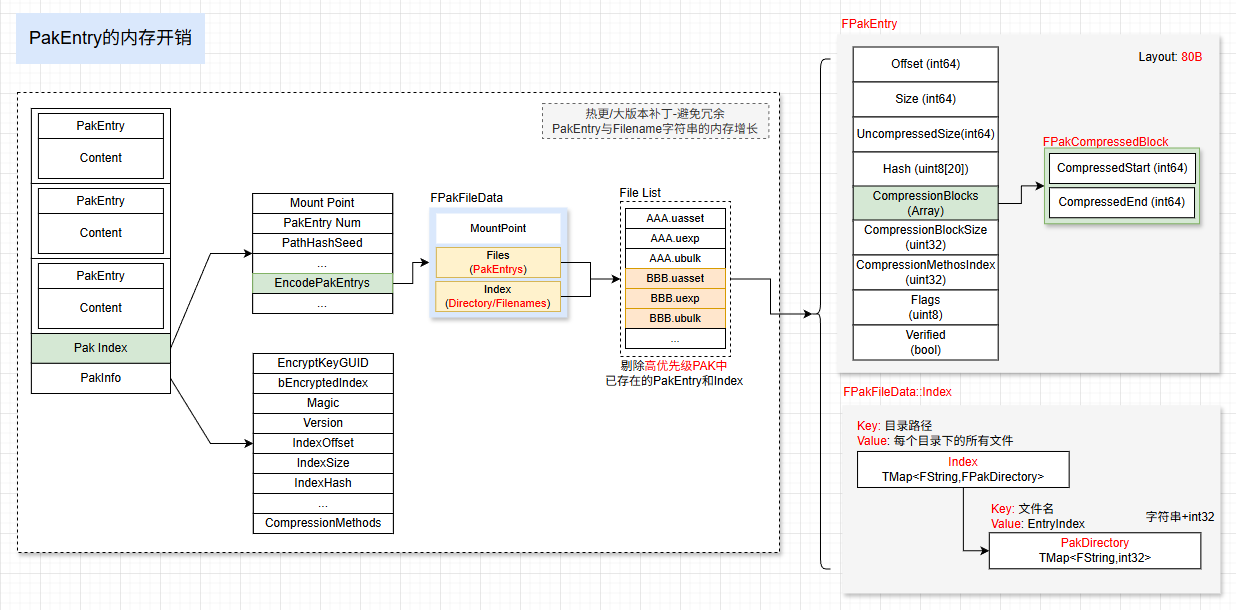
This will result in two types of overhead:
- Memory consumption
- File querying
Therefore, based on this solution, a further optimization is needed: for redundant assets, their PakEntrys should be removed at runtime. No matter how many major version patches there are, memory consumption will always be consistent with the full package, and the same applies to hotfixes.
Data Presentation
This solution has been officially applied in an online project and showed excellent data benefits during the first test phase of APP package update: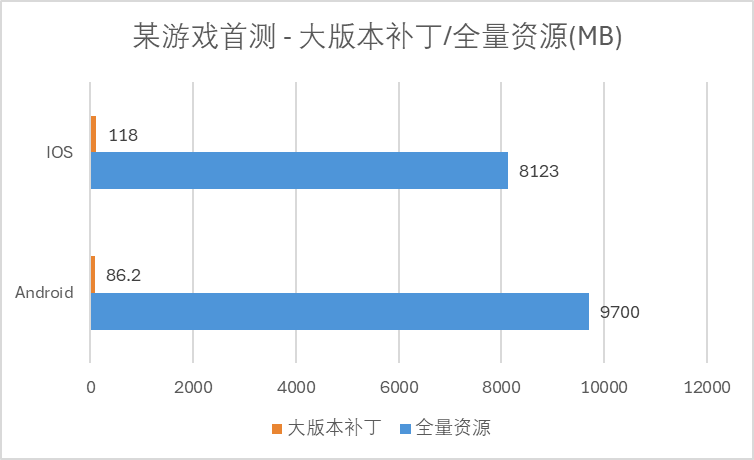
Upgrading through a major version patch reduced the download size by two orders of magnitude.
Note: The first test period was relatively short, so the differences weren’t as dramatic. However, it can also indirectly prove that when APP updates are unavoidable (e.g., critical bug fixes, serious issue resolutions), using a major version patch mechanism can similarly minimize the user’s download perception and reduce churn rate.
Supplementing another set of data, after several months of long-term operation, during normal version change cycles, the effect remains excellent: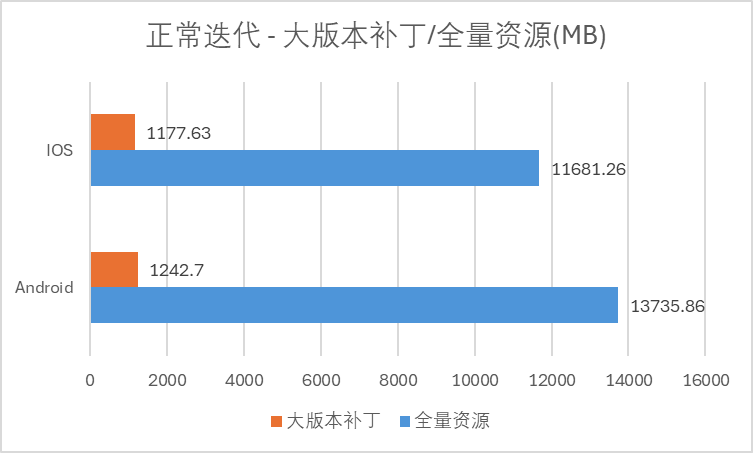
Using the major version patch solution, the size of dynamically downloaded resources during game runtime was reduced to about 10%, a 90% reduction.
Comprehensive Benefits:
- Significantly reduced download size and shortened download time.
- CDN peak drastically decreased (pre-download push + reduced download time).
- Smoothed out CDN peak pressure.
Greatly reduced CDN costs during the project’s operation phase.
Further Optimization
The content introduced above is not yet the ultimate size optimization. In addition, it can be combined with my previous article: UE Hot Update: Binary Patch Solution for Resources, to create binary file differences for major version patches, which can further significantly reduce patch size.
Because the underlying technology reuses the HotPatcher hotfix process, all the hotfix optimization strategies introduced in previous blog posts can also be used in major version patches, achieving a 1+1>2 effect.
Conclusion
This article introduces a solution for reusing old version resources on new APP versions, which can significantly reduce download size during version changes and has achieved excellent benefits in online projects.
I have implemented the major version patch part as an independent MOD: ReleasePatcher. The entire solution + optimization strategies can be implemented within the HotPatcher technical framework. By integrating HotPatcher + ReleasePatcher (Mod), the full functionality of major version patches can be achieved.
The latest versions of HotPatcher and the Mod are not yet publicly released, and this article can serve as a reference for engineering practice.