For game projects, we always want players to experience the latest version with minimal cost. This includes CDN costs during operation, as well as the bandwidth and time costs for players during downloads. Smaller, faster, and more efficient are our eternal pursuits.
So, when a game update (what we call a major version update) occurs, must players re-download the entire set of resources?
Large mobile games in the current market have massive resource sizes, often reaching 10+ GB. Requiring a full download for every update is a poor choice for both operational costs and user experience.
However, since players have the full resources of the previous version locally, we can significantly reduce the required download size by leveraging them. We need a mechanism to reuse old version resources!
This article shares a resource reuse solution for major version updates based on this pain point, minimizing player downloads while ensuring ease of release and maintenance.
In actual live project operations, this has achieved excellent results.
Preface
First, let’s consider a question: When Unreal Engine (UE) re-packages, which files/resources might change?
Due to UE’s build process, when performing a full re-package, the potential changes compared to the previous version are highly complex. From engine base configurations to underlying rendering, and from asset property changes to serialization methods, any of these can cause discrepancies in the build artifacts.
Unlike hot patching—which performs incremental updates while keeping the engine core stable, only modifying Gameplay logic without affecting asset serialization—full version updates can cause changes to any resource!
In my previous article (Runtime Pak Reorganization Scheme in UE), I proposed a runtime-reorganization-based update scheme. However, it requires the client to handle Pak creation and encryption, increasing computational pressure: diff calculation, fragmented download requests, local Pak generation, and encryption. It also introduces potential risks of key leakage (as all Paks must be decrypted before reorganization).
Therefore, we need a solution that accommodates any asset change while being easy to maintain and not increasing client computational pressure. We also prefer client-side decryption, which allows for dynamic key distribution to protect unreleased pre-embedded assets (refer to UE PAK Encryption Analysis and Hardening Strategies).
Local Legacy Resources
Before we begin, let’s consider: when the installation package updates from 1.x to 2.0, what assets are contained locally?
Let’s take Android as an example and analyze the app’s installation and UE’s process for loading files from the installation package.
When an APK is installed on a phone, it is essentially installed into the following path (/data/app/ + package name + random characters):
1 | sagit:/data/app/com.xxx.yyy-zpgq5nHyY9CNxdLbiAdAgQ== |
UE’s resource files reside within assets/main.obb.png inside the APK; they are not extracted and remain inside base.apk:
1 | Archive: base.apk |
When the game launches, the AndroidPlatformFile initializes by reading main.obb.png from base.apk and establishing a virtual mapping structure, allowing for reading internal Paks without extraction.
1 | virtual bool Initialize(IPlatformFile* Inner, const TCHAR* CmdLine) override |
The directory structure inside main.obb.png matches the virtual paths defined by the engine:
1 | Archive: main.obb.png |
Remember the three auto-mounted directories in the engine introduced in my blog (Pak Automatic Mount Directories)? This mapping allows for cross-platform file reading within the package via the engine’s UFS PlatformFile mechanism.
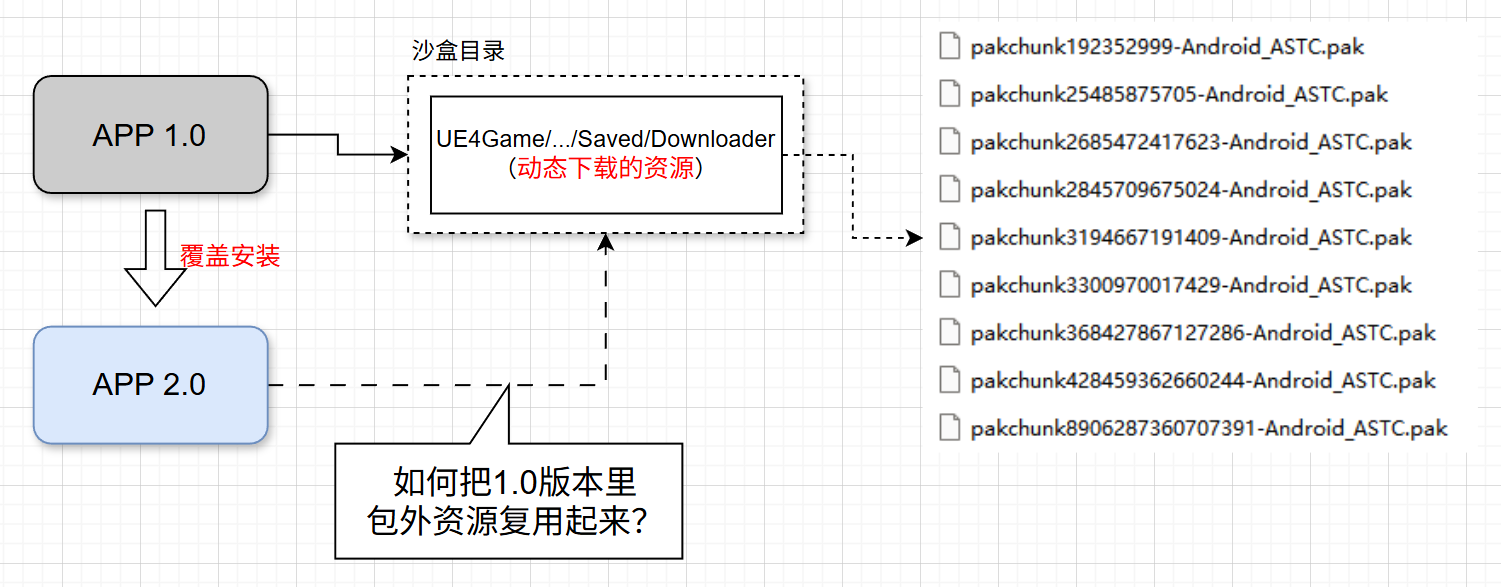
Runtime data directories (e.g., Saved) do not exist in /data/app/. They are written to a separate sandbox directory (refer to UE Source Analysis: Modifying the Default Game Data Storage Path), which is independent of the app directory and persists during app upgrades.
When an app is overwritten/updated, the following underlying changes occur:
- APK Path Update: The old installation path is deleted; the new APK is placed in a new random-character directory.
- Library Update: Native
.solibraries in/lib/are cleared and re-extracted from the new APK. - Bytecode Recompilation: The system deletes old
.odexor.vdexoptimization files and performs AOT (Ahead-Of-Time) compilation or class verification for the new APK.
Conclusion: When an app is updated via overwrite, files inside the installation package are replaced with the new version, but the data directory remains intact.
For UE, updating the app via overwrite results in the following: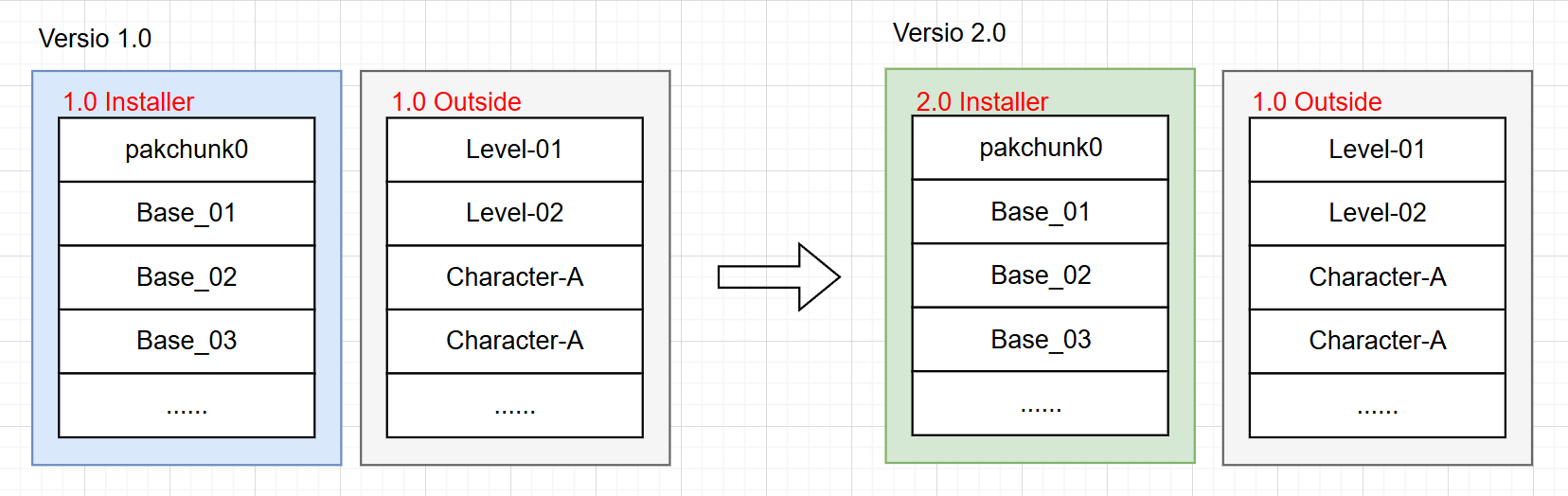
As shown, assets outside the 1.0 installation package (usually all dynamically downloaded parts) remain locally.
For the requirement of major version resource reuse, we can reuse assets outside the installation package of version 1.0 on top of the 2.0 app version.
Feasibility Analysis
When legacy assets from the previous app version remain locally, what does this mean for UE?
When changing app versions, underlying changes typically occur:
- Asset class modifications: adding/deleting properties, changing serialization methods.
- Engine configuration changes: causing passive asset changes.
- C++ class modifications: affecting Blueprint assets.
- Underlying rendering code changes: requiring Shader recompilation.
- …
These can cause programs to be misaligned with old assets, leading to potential crashes or rendering errors.
Relying on UE’s virtual file system, the game depends on loading the correct files. For a new app, some old resources may now be incorrect, so we must use patches to replace mismatched files and add files missing from the old version.
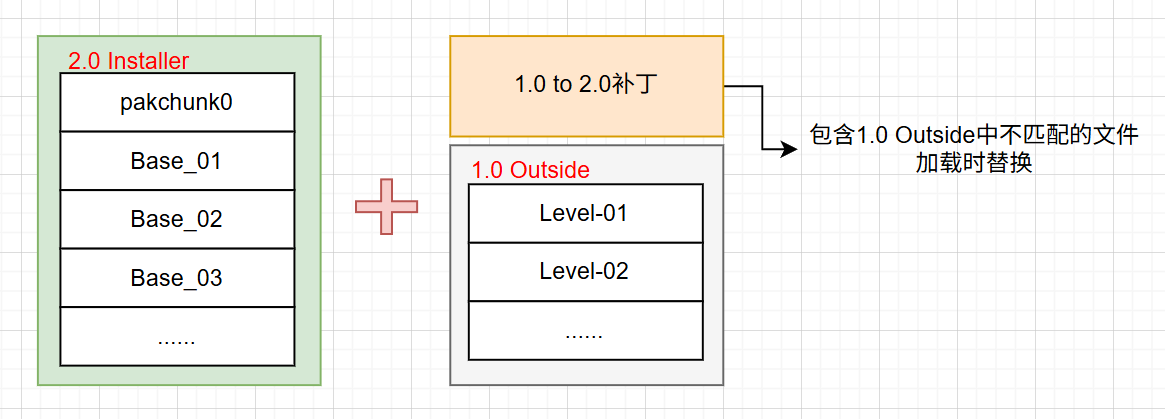
Simply set the correct priority using the engine’s Pak Order mechanism, ensuring patches have higher priority than old version resources—just like hot patching.
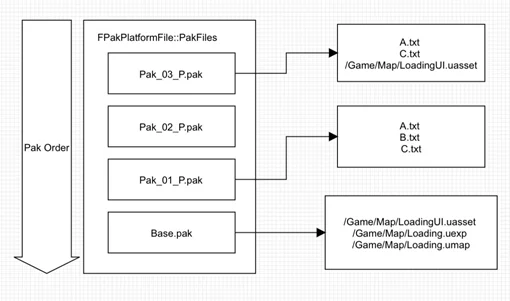
Since the engine’s base mechanism supports this, the key is: how do we identify which legacy assets are mismatched?
How to Identify Differences?
For UFS, we need the engine to read the latest files—whether UASSETs, script code, or data files. They are all “files” to UFS. The only difference is that UASSETs generate a final file list after COOKing.
Thus, we need to calculate the difference for all files outside the installation package between 1.0 and 2.0 (ignoring those already included in the 2.0 APK).
- For ordinary files, calculate the HASH value directly.
- For UASSETs, calculate the HASH of the COOKED artifact.
Simply put, we must record the HASH value of every file in each version during packaging and distinguish whether a file resides inside or outside the installation package. Differences in HASH values for files with the same path identify mismatches.
I implemented this in the release export process of HotPatcher. Previous versions only recorded the GUID of original UASSETs and the HASH of the file; I extended this to record the HASH of the COOKED file for each platform.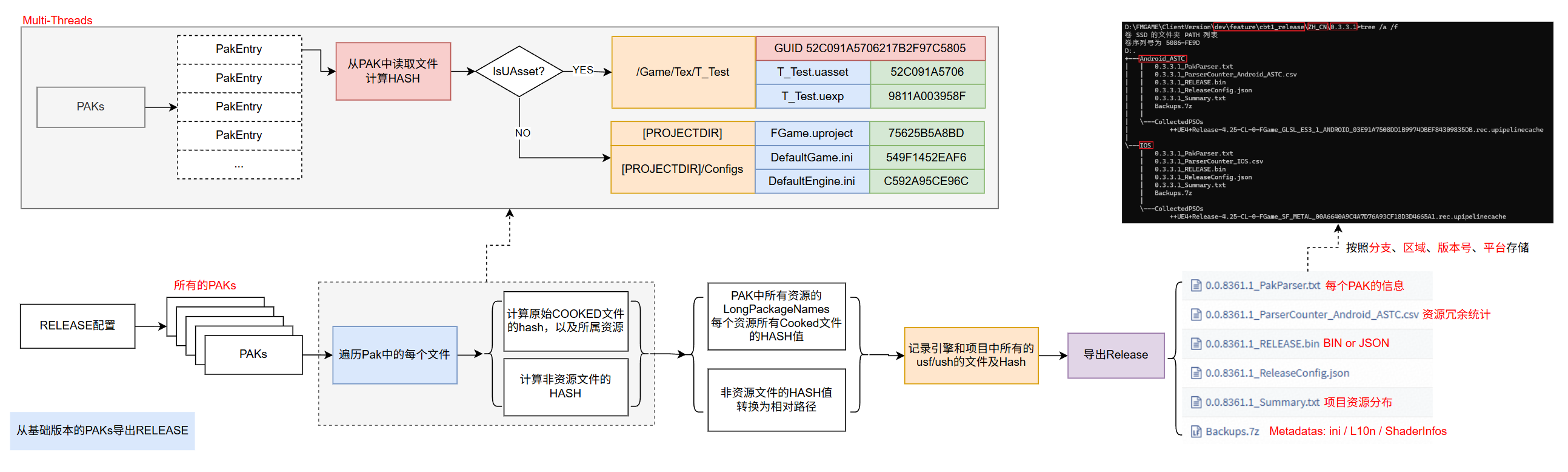
UASSET export information: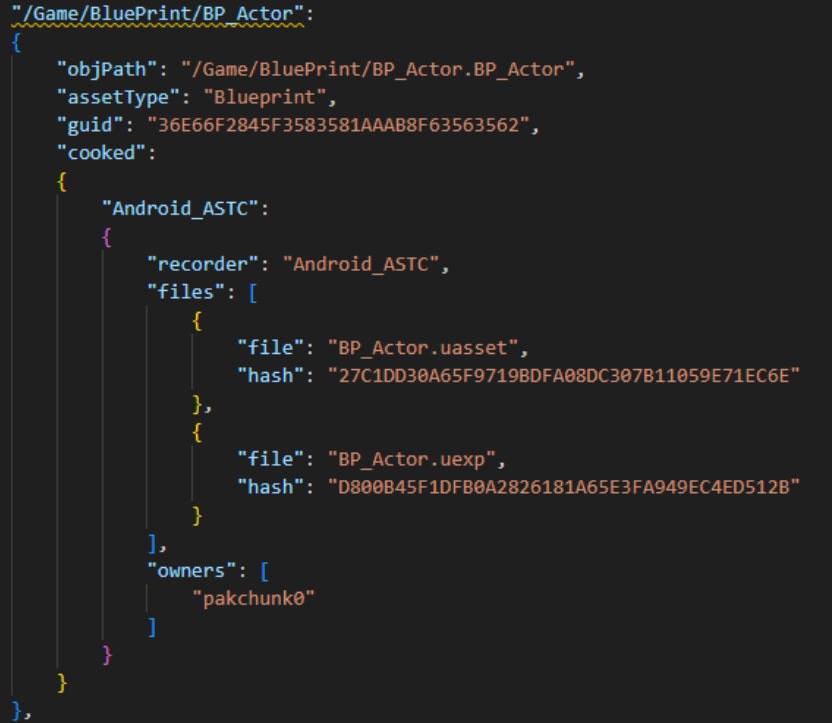
It also records which Pak a file belongs to, allowing us to identify if an asset exists within the installation package.
In HotPatcher‘s hot-patching workflow, we generate Release data after every build. For major version patching, we can directly reuse Release data from two versions to calculate the diff, revealing all differences between the old and new versions.
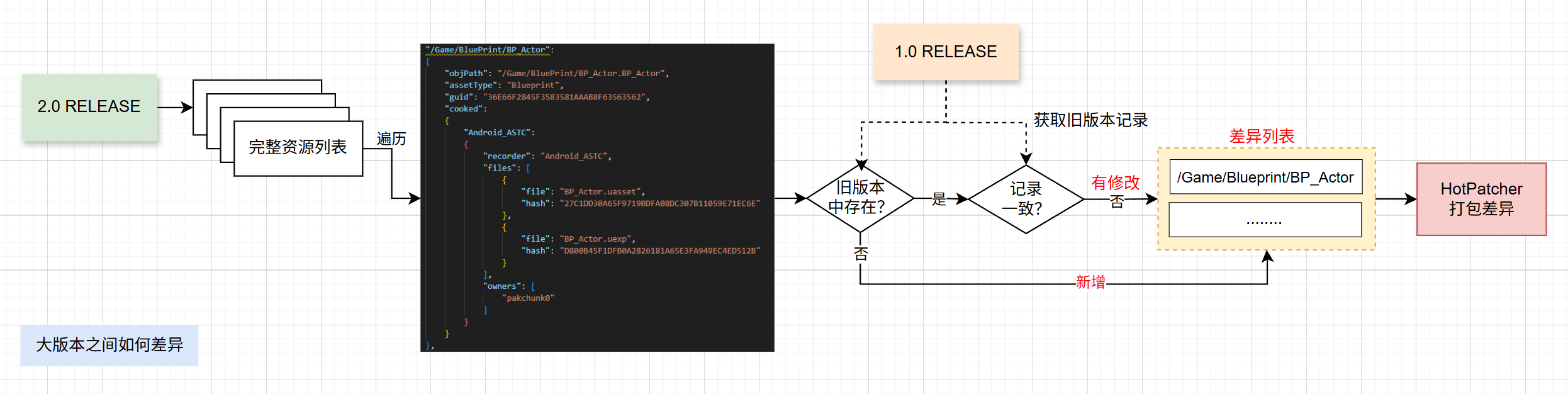
By using the latest project + new and old Release data, we can execute the major version patch diff process and generate complete patches using HotPatcher.
You might ask: “Can’t I just take all the PAKs from both versions and diff them? What’s the point of HotPatcher‘s Release data?”
Great question! The answer:
While it is true that one could diff the PAKs directly, HotPatcher also utilizes the PAK data exports. However, major versions have exceptions and maintenance costs:
- ShaderCodeLibrary: Always differs between versions; including it entirely is wasteful (e.g., hundreds of MBs on iOS).
- Data files: Similar to ShaderCode, files like AssetRegistry face the same issue.
- Maintenance: Keeping full PAK files (10GB+) for every version is a nightmare.
- Deletions: Files removed in the new version must be marked as deleted via UFS in the patch.
Using HotPatcher‘s framework avoids these problems, offering flexible version control with minimal maintenance (e.g., for a 400k+ UASSET project, Release data is only 50MB). You don’t need to handle differential logic for ShaderCodeLibrary or Registry; simply generate the patch and release.
From an engineering perspective, HotPatcher provides an end-to-end optimization solution—no need to manage internal technical details. It integrates perfectly with the hot-patching workflow.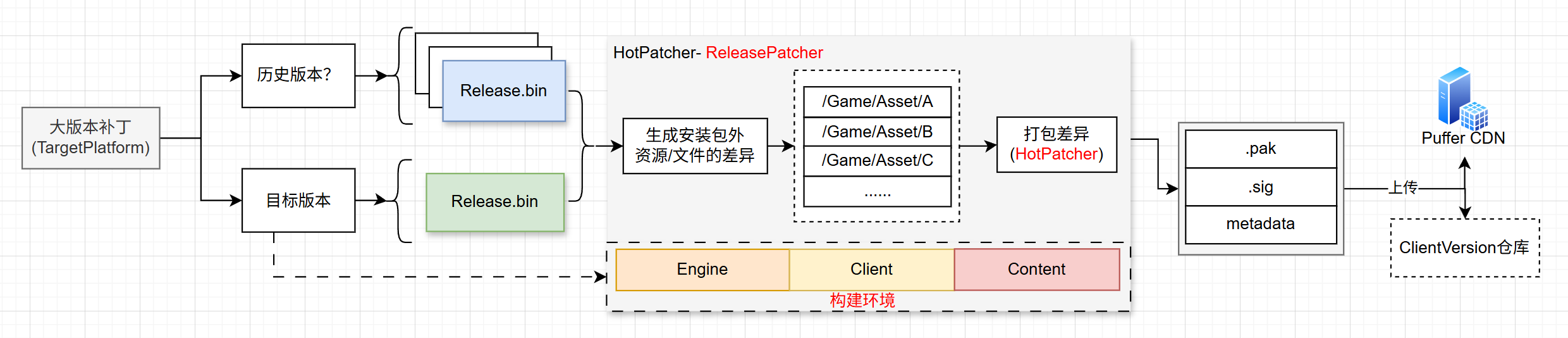
What to Package?
Major version patches can only be packaged based on a base version shared by all players.
For example, if players are at 1.1, 1.2, and 1.3, their local hot-patch status is inconsistent. We must use their common version, 1.0, as the base for the diff.
This does cause some waste (some resources in 2.0 might already exist in hot-patches), but it is a trade-off. Real-world projects must balance maintenance cost, complexity, and gains.
Additionally, HotPatcher implements a multi-stage layered diff mechanism to minimize the size:
- Initial diff analysis based on UASSET changes, including passive changes.
- Convert UASSET diffs to COOKED file diffs. If a UASSET modification only affects part of the COOKed output, only that file is packaged.
- If a UASSET’s GUID changes but the COOKED output doesn’t, it is excluded.
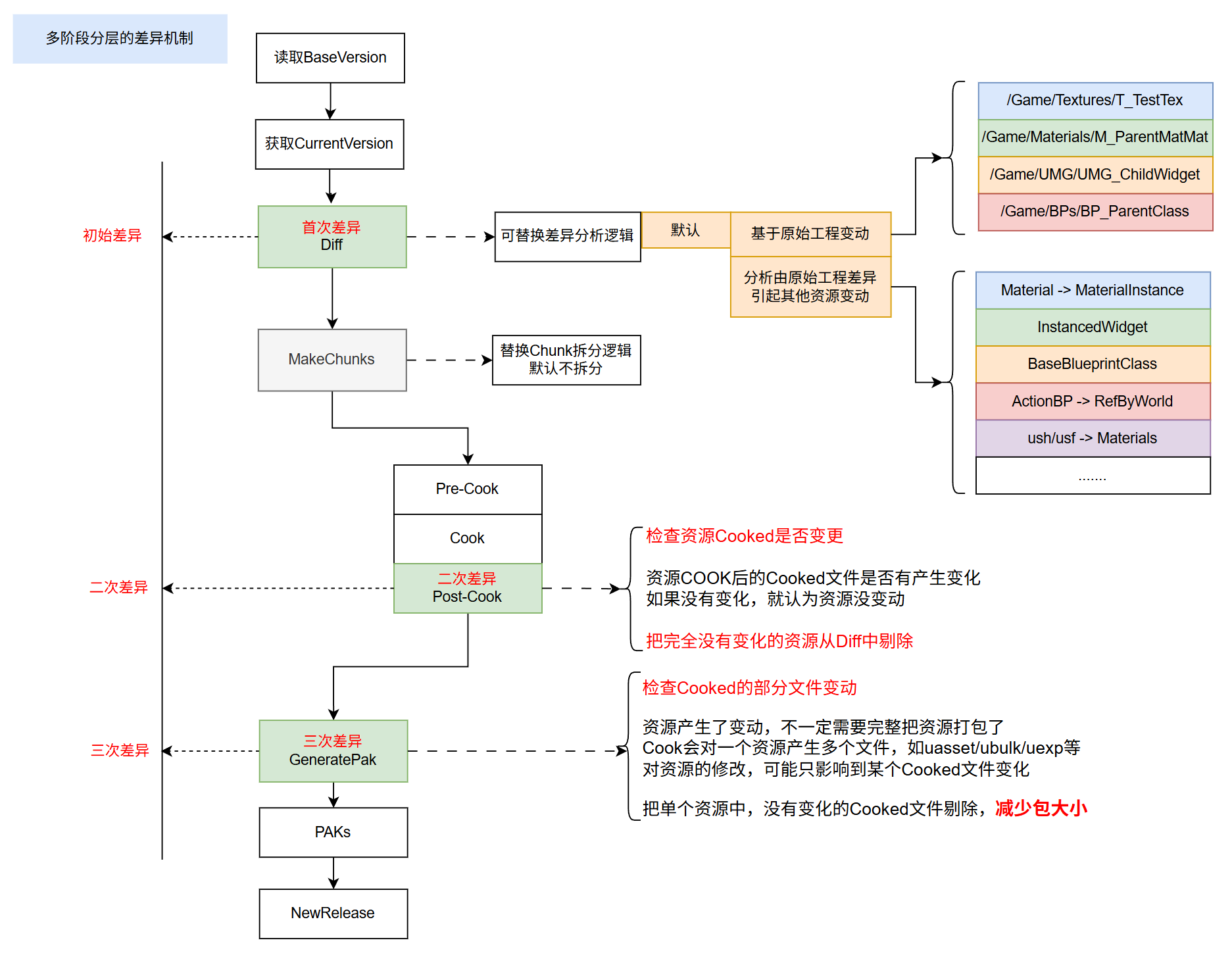
Note: This mechanism can be used for both major version patches and hot-patch flows.
This packages only the actual changed parts between the two versions.
Cross-Version Patching
Simply put, the major version patching process is:
- Select an old version’s Release data.
- Use the latest project + latest version Release data.
- Call HotPatcher to build.
By controlling the old version’s Release data, you can build patches spanning multiple versions; maintenance cost is just keeping a few extra Release data files.
Runtime Workflow
Once the patch is ready, the runtime download and loading flow must be adapted to handle the new app + legacy resources + major version patch.
Two tasks:
- Detect local resource integrity; distinguish between downloading major version patches vs. full packages.
- Correctly handle PakOrder based on: New App + Legacy Resources + Major Patch + Hot Updates.
Download Switching
Launch-time environment detection flow: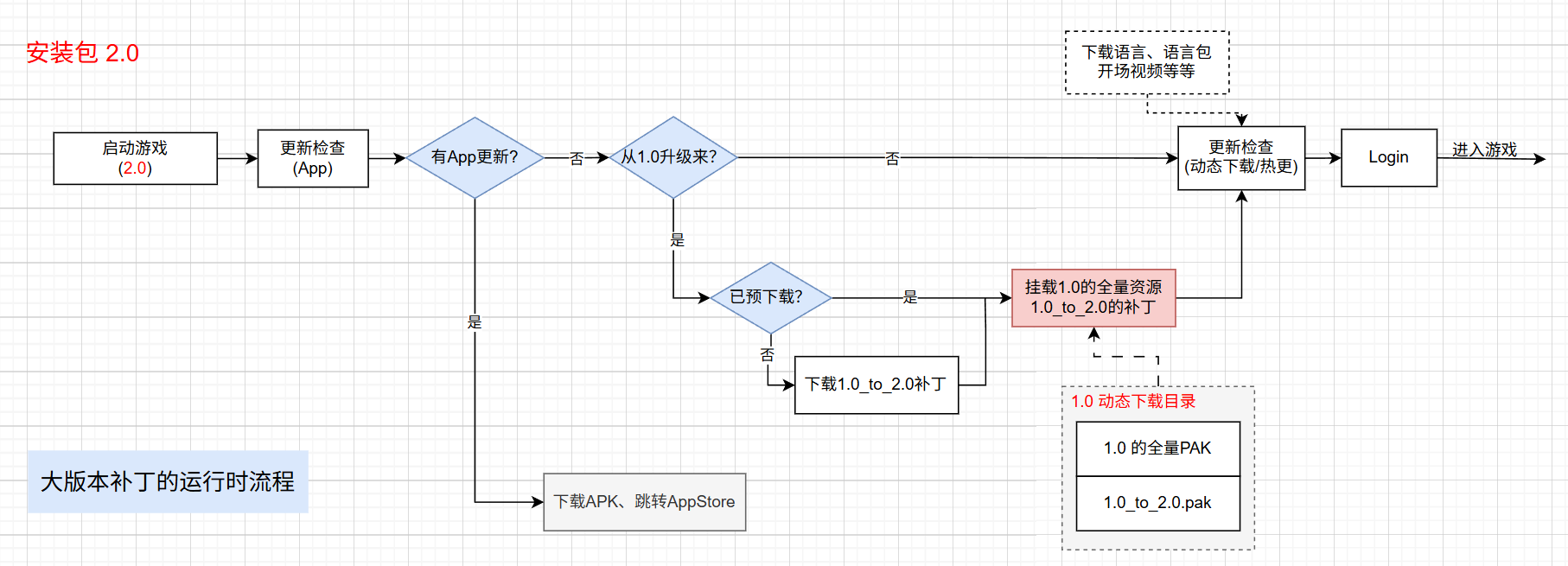
Mounting and PakOrder
The crucial issue is managing the load Order of Paks from multiple sources.
For major version patches, sources include:
- Legacy resources.
- Major version patches (potentially multiple, e.g., 1.0_to_2.0, 2.0_to_3.0, 3.0_to_4.0).
- New app internal PAKs (e.g.,
pakchunk0). - Dynamically downloaded resources.
- Hot-patched resources.
Priorities must increase incrementally to avoid conflicts: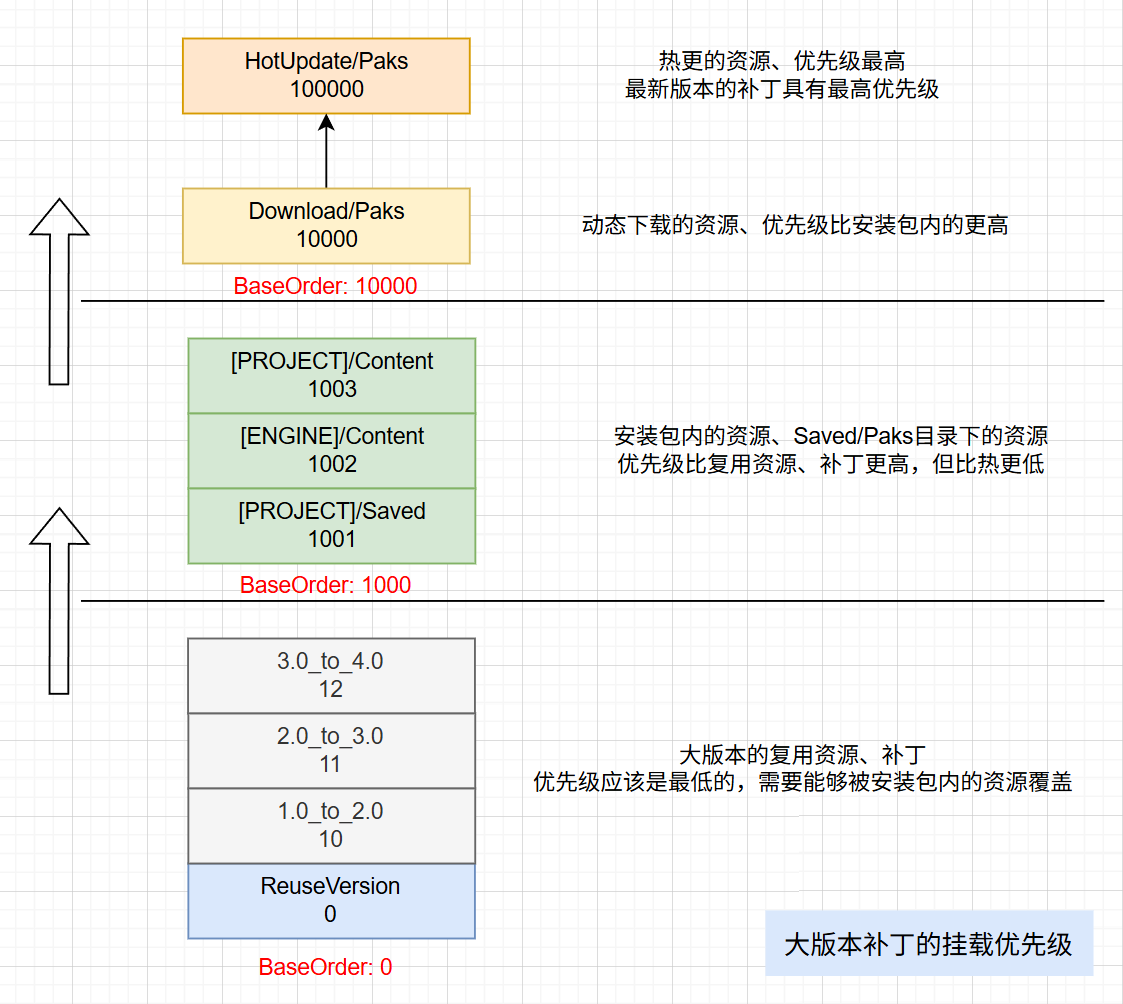
This design handles cumulative major patches correctly. Active players enjoy minimal download sizes. Returning players can download all patches from their local version to the latest, or we can provide a single merged patch for those skipping many versions, depending on project needs.
Impact on Hot Patching?
No impact. For any version, there are two scenarios:
- Fresh installation: Download full package.
- Upgraded from old version + major patch.
Based on the flow, old version + major patch aligns perfectly with the latest baseline. For hot patching, since both are based on the same baseline, there is no difference.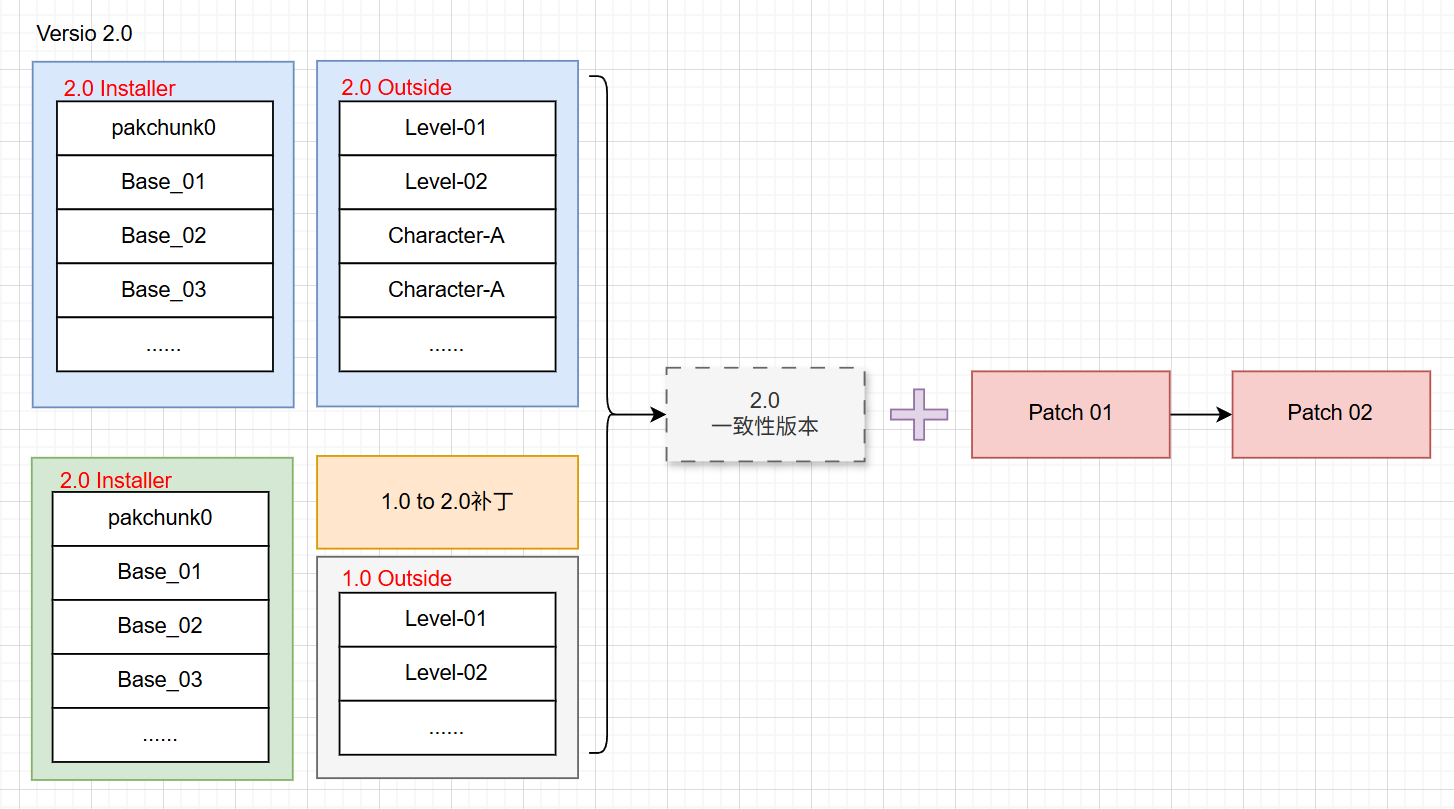
Subsequent hot updates simply use HotPatcher to diff against the 2.0 baseline. The complexity is lowered because the hot-patching layer doesn’t care if the client was a fresh install or a patched one.
Potential Issues and Optimization
Major version patching essentially mounts several extra PAKs, leaving some redundant files. Unless runtime reorganization is performed, redundant space cannot be cleared.
Beyond storage, I focus on runtime efficiency.
Does patching cause performance issues?
It involves fixed memory overhead for Pak mounting, which is negligible. The main concern is PakEntry growth: PakEntry corresponds to every file in a PAK, used for UFS lookups. As redundant files accumulate, memory usage for PakEntry increases linearly.
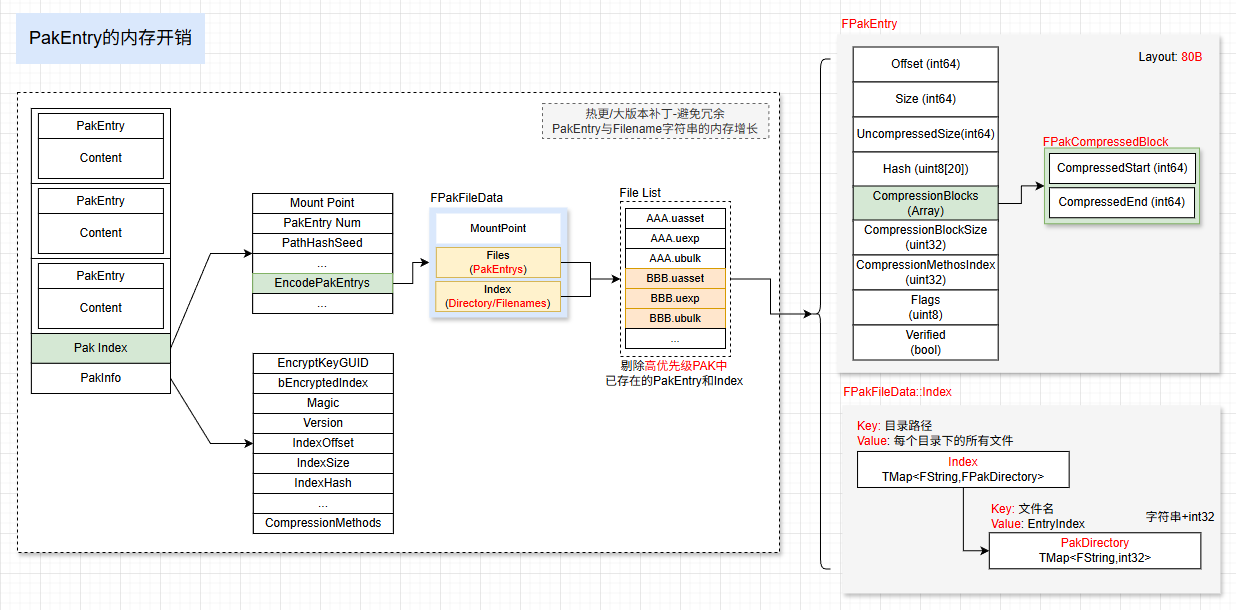
It impacts:
- Memory usage.
- File query speed.
Therefore, an optimization step is needed: remove PakEntry for redundant assets at runtime. Regardless of the number of major patches, memory usage remains consistent with a full package, as does hot patching.
Data
This scheme is live. During the first test when the app updated, it showed excellent results: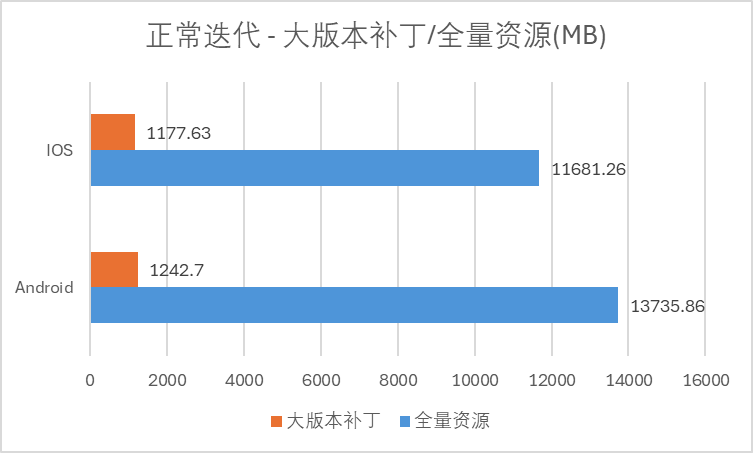
Upgrading via major patches reduced download volume by two orders of magnitude.
Note: The first test was short, but it proves that when app updates are unavoidable (e.g., critical bug fixes), this mechanism minimizes user download perception and churn.
Another data point: after months of operation, typical version updates still show great results:
The major version patch scheme reduced dynamic download sizes by 90%, down to about 10%.
Total Benefits:
- Significant reduction in download size and time.
- Drastic reduction in CDN spikes.
- Lower CDN costs during operations.
Further Optimization
This is not the absolute limit. You can combine this with my previous article: UE Hot Patching: Binary Patching Scheme for Resources to create binary file diffs, further reducing patch sizes.
Since all underlying technology reuses the HotPatcher flow, all previously introduced optimization strategies apply to major version patches, achieving a “1+1>2” effect.
Conclusion
This article introduced a scheme to reuse legacy resources with new app versions, significantly reducing download sizes during updates. It is highly beneficial for live projects.
I implemented the major version patch logic as a separate MOD: ReleasePatcher. The entire solution and optimization strategies can be implemented within the HotPatcher framework. Simply integrate HotPatcher + ReleasePatcher (Mod) to achieve complete major version patching.
The latest version of HotPatcher and the Mod are not yet publicly released; this article serves as an engineering practice reference.